


Important information:
Am 10. April 2024 wurden das Kundenportal sowie der Web-Zugriff auf das Kartenkonto eingestellt. Bitte laden Sie die Swiss Bankers App herunter, um weiterhin uneingeschränkten Zugriff auf alle Dienste zu haben.
Are you a Swiss Bankers sales partner?
Hier geht es zum Partnerportal.
A message regarding your customer account, a request for updated details or a card that has allegedly been blocked: phishing emails sent in the name of Swiss Bankers may appear credible at first glance. It is therefore crucial to take a closer look – particularly at the sender’s address and the destination of any links. Find out how to spot suspicious messages and how to respond safely if in doubt.
 13.10.2026
 Eliza
In phishing scams, fraudsters pose as a trustworthy company or individual in order to obtain sensitive information. To do this, they send emails that appear to come from Swiss Bankers. A link leads to a fake website where you are asked to enter your login details or card information. This information then ends up in the hands of the fraudsters.
The message doesn’t need to be conspicuously poorly written. A familiar company name, a businesslike tone and a neatly formatted signature are enough to inspire trust. Even a correct company address or telephone number in the body of the email is no guarantee of authenticity: such information can easily be copied.
Swiss Bankers will never ask you by email to disclose your full card number, login details or similar confidential information. This also applies to requests to confirm such details via a linked form.
Do not disclose passwords, your PIN, your card’s security code or confirmation codes in this way. Do not confirm any payment in the app that you have not initiated yourself.
A purported security check does not make such requests any more trustworthy. On the contrary: it is a reason to verify the message via an independent channel of communication.
The following examples show how fake emails sent in the name of Swiss Bankers are designed to trick recipients into clicking a link:
Under the heading ‘Notice regarding your customer account’, the message claims that a notification is available. To read it, you are asked to log in via the ‘Go to customer account’ link. The brief content arouses curiosity without explaining the reason in more detail.
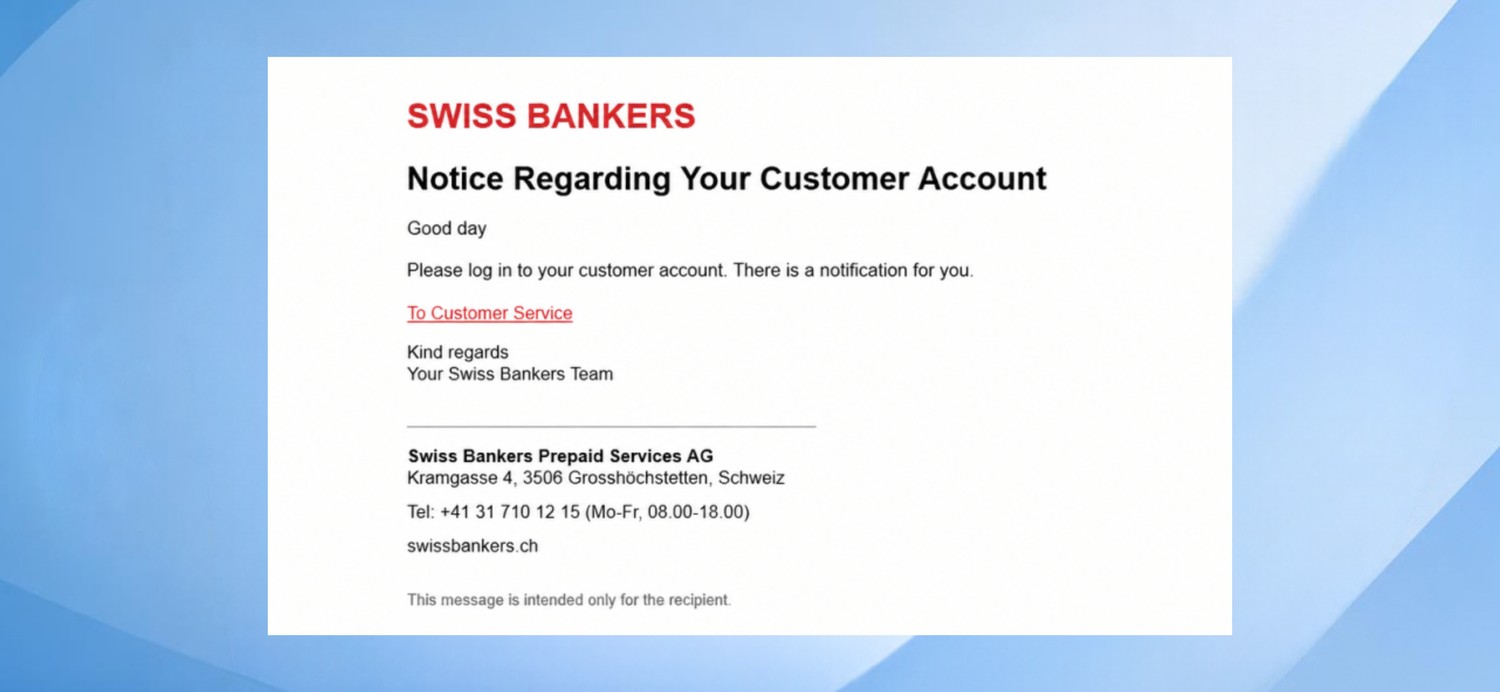
Screenshot: Under the heading ‘Note regarding your customer account’, it is claimed that a notification has been sent.
An email with the subject line ‘Update your account details’ asks you to log in to your customer account and update your details. The message sounds like a routine administrative task.
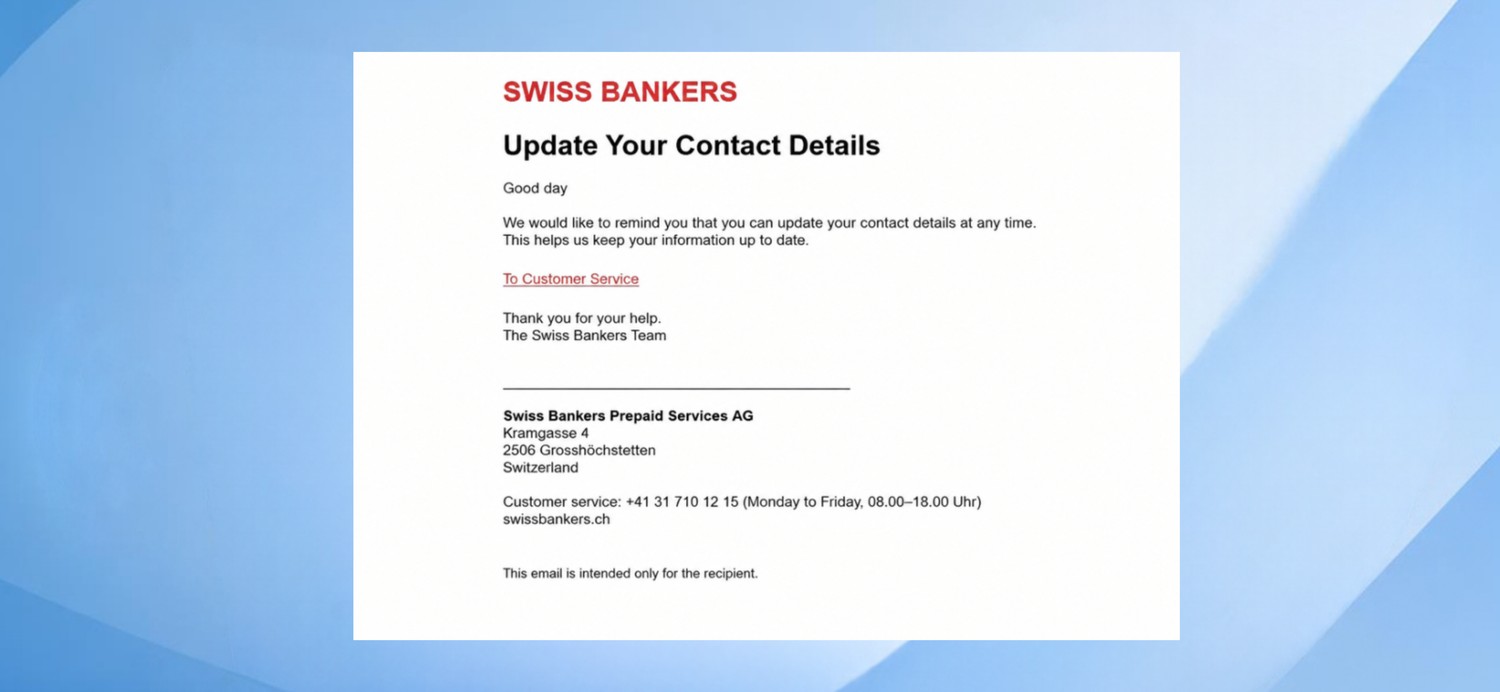
Screenshot: An email asks you to log in to your customer account and update your details.
Under ‘Information about your card’, you are told that the card has been temporarily blocked. For further information, you are asked to contact customer services or follow a link to your customer account. The worry that you will no longer be able to make payments may prompt you to react quickly.
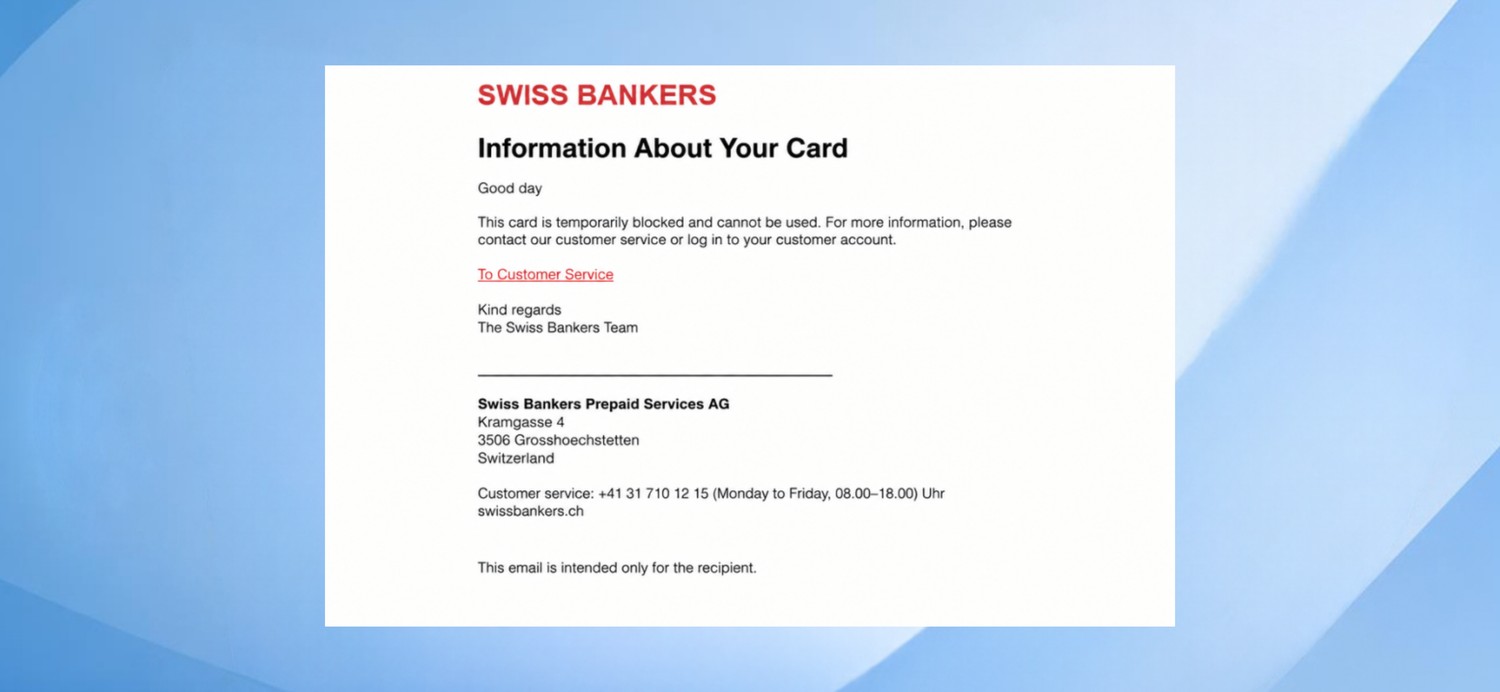
Screenshot: Under ‘Information about your card’, a message states that the card has been temporarily blocked.
What all three examples have in common is the link ‘Go to customer account’. However, the visible link text does not reveal what is actually behind it. This is precisely where it is worth checking before you take any action.
Often, only a display name such as ‘Swiss Bankers’ appears in your inbox. Fraudsters can choose this name freely. You should therefore always check the full email address behind it.
On your computer, hover the mouse pointer over the displayed sender’s name without clicking. Depending on your email programme, this will reveal the address. If that doesn’t work, use the relevant function in your programme to view the sender’s details.
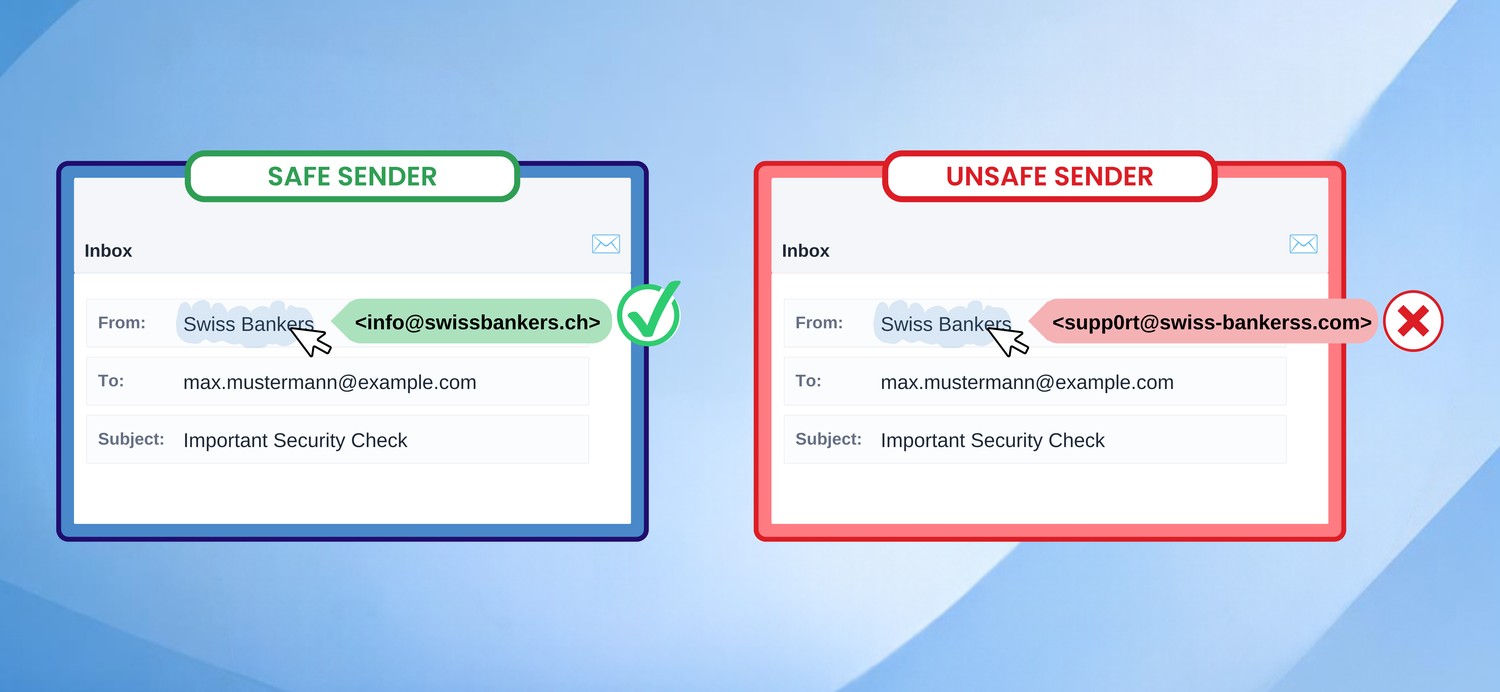
Pay particular attention to the part after the @ symbol. Does it match the alleged company? Are there any transposed letters, extra words or an unusual ending? For example, any address from a free email provider would look suspicious in a customer message of this kind.
Important: Even a sender address that appears to be correct is no guarantee. Addresses can be forged. You should therefore also check the link destination and the content of the message.
A link may be labelled ‘Go to customer account’ or even display a familiar web address, yet still lead to a completely different website.
Hover your mouse pointer over the link or button without clicking. Depending on your browser, the actual destination will appear in a small tooltip or at the bottom of the window. Read the displayed address carefully.
The official Swiss Bankers website is swissbankers.ch. However, just because the company name appears somewhere in an address does not mean that it belongs to Swiss Bankers. A hypothetical example illustrates the difference: in the case of swissbankers-ch.kundenservice.com, kundenservice.com is the actual domain – not swissbankers.ch. The prefix ‘swissbankers-ch’ may give the false impression of an official connection. You should therefore check the full address and not rely solely on a familiar name.
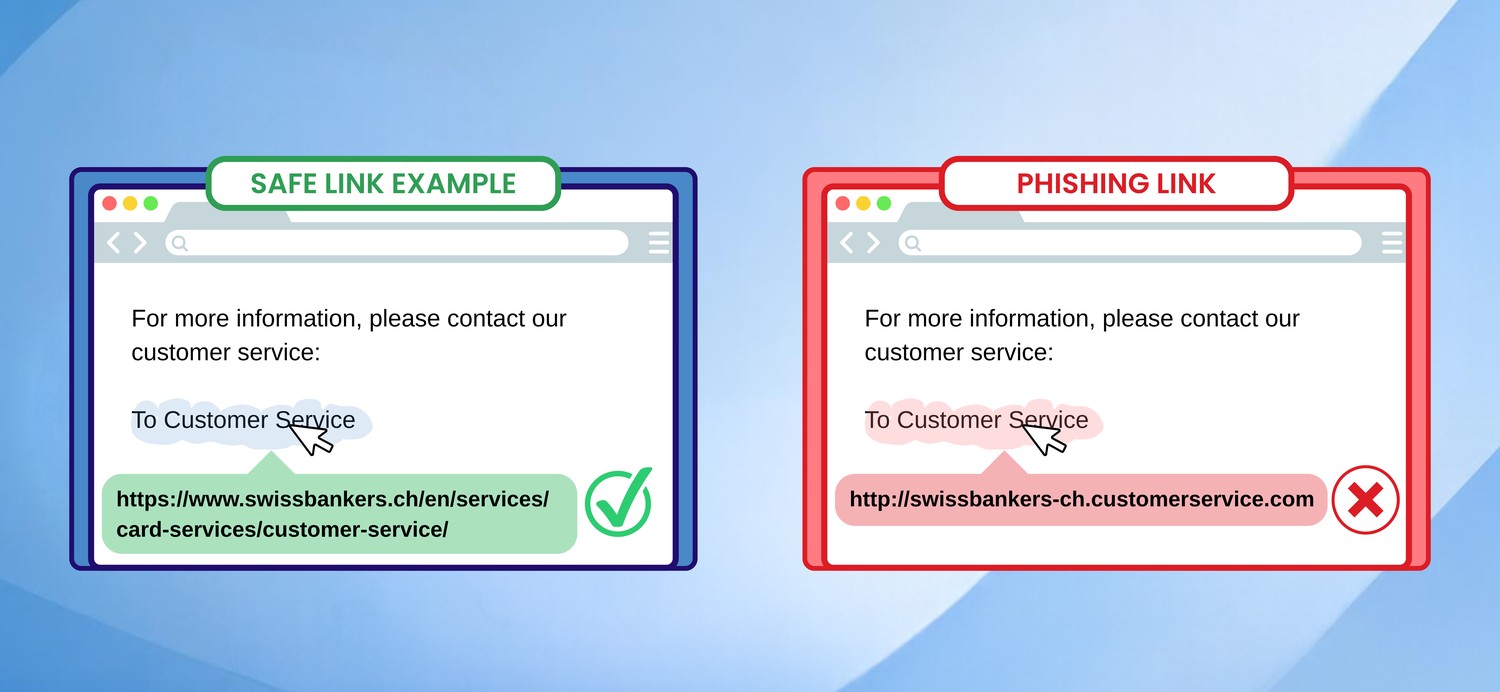
Even a familiar company name after a slash proves nothing about who runs the website. Similarly, ‘https’ simply means that the connection is encrypted; even fraudulent sites can use this encryption.
If the destination is unclear or the address cannot be displayed in full, do not click on the link. Instead, open the Swiss Bankers app directly or type the known website address into your browser yourself. This is also a sensible alternative to checking links on a smartphone.
Many phishing emails rely on creating a sense of urgency: they urge you to act immediately, prevent an account from being blocked or confirm your details within a few hours. You should examine such requests with particular care.
However, the examples described show that fraudsters can get away with it even without drastic deadlines. A polite request for updated details can be just as deceptive as a matter-of-fact message about a card being blocked.
Even error-free language, a personalised greeting or a professional appearance do not guarantee authenticity. The key is to consider the combination of the sender’s address, the link destination and what you are being asked to do.
If you’re unsure, there are just a few simple steps you can take to check the message without taking any unnecessary risks:
Pause for a moment: Do not click on any links, do not open any attachments and do not reply to the suspicious email.
Check the sender and the link destination: View the full addresses and look out for any discrepancies.
Use an official channel of contact: Open the Swiss Bankers app directly or go to the website swissbankers.ch, which you have entered yourself. Use the contact details provided there.
Have the message checked: Contact customer services to verify whether the email actually comes from Swiss Bankers. Do not use any telephone number or contact address from the suspicious message; instead, use the contact details on the official website, swissbankers.ch.
Secure any affected cards: If your card details have been compromised or you suspect card misuse, use the ‘Block card’ function in the Swiss Bankers app under ‘Card settings & PIN’; you can then order a replacement card via ‘Replace card’. This automatically initiates the necessary process. If you are unable to use the app, please contact customer services immediately.
Report unknown reservations or transactions: If reservations or transactions have already been made on your card account that you did not authorise yourself, report these immediately to Swiss Bankers using the dispute form.
You do not need to be able to prove beyond doubt that a fraud attempt has taken place. If anything remains unclear, the correct next step is to make enquiries via an official channel.
If you have entered details on a suspicious website, it is vital to prevent further unauthorised access and card fraud as quickly as possible:
Secure the affected card: If your card details have been compromised or you suspect card fraud, use the ‘Replace card’ function in the Swiss Bankers app under ‘Card settings & PIN’. This automatically initiates the necessary process – your current card will be blocked and a replacement card ordered. If you are unable to use the app, contact customer services immediately.
Contact Swiss Bankers: Report via an official channel what information you have disclosed and whether you have confirmed any payments.
Change any affected passwords: Open the relevant service directly. If you have used the same password elsewhere, change it there too.
Check and document: Review your transactions, report any unauthorised charges and keep the suspicious email and relevant screenshots as evidence.
If you have simply opened a link, do not enter any further details and close the page. If anything was downloaded or installed in the process, you should also have your device checked.
Phishing emails do not necessarily have to appear threatening or obviously flawed. So make it a habit to check the full sender’s address and the actual link destination. If you have any doubts, open the app directly and contact Swiss Bankers through an official channel. This way, you’ll stay in control of your data – even if a message seems familiar at first glance.
On Card Security, you’ll find further information on phishing and other scams, as well as practical tips on how to protect your card and your data.

© Swiss Bankers 2026


 Compare cards and conditions

